
Zabiris QR · QR menu and table ordering
Menu, orders and waiter calls from the table to the phone.
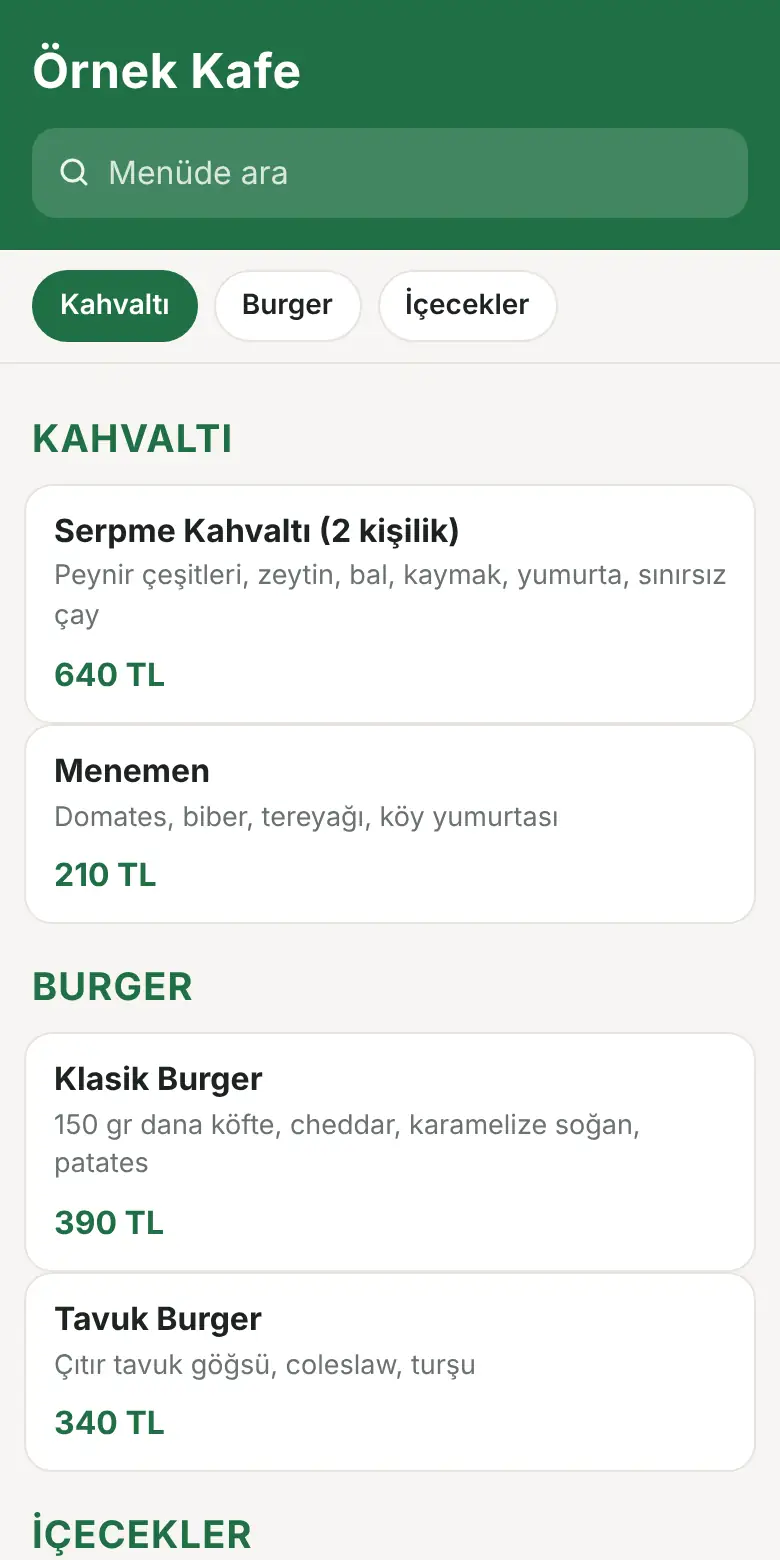
Your guest scans the QR on the table; your menu opens on the phone. They order from the table, call the waiter and ask for the bill. All of it appears on your Zabiris POS check.
- No app to install
- Your QR stays the same even when the menu changes
- Turkish, English, German, Russian
- The same QR takes delivery orders
Already a customer? Sign in to the QR panel
How it works
From table to order in three steps
Scan the QR
The QR on the table card opens the menu for that table. No app needed.
Order or call
The guest picks items, writes a note, sends the order. They can call the waiter or ask for the bill.
It appears on your POS
Orders, waiter calls and bill requests appear on the Zabiris POS check with the table name. The guest follows the status on the phone.
Features
Everything that makes your work easier, in the dining room and for delivery
Table ordering
The guest selects an item, picks options and notes, and sends the order. They follow the status on the phone.
Waiter calling
One tap calls the waiter to the table. The call appears on your screen with the table name.
Bill request
The guest asks for the bill and chooses a payment preference: cash, card or meal card.
Appears on Zabiris POS
Everything from the table and from delivery appears on the POS check. No separate screen to watch.
Delivery orders
Take delivery orders through the same QR or menu link. Distance limit and delivery fee are up to you.
Menu in four languages
The menu opens in the guest's language. Items with translations appear in that language; the rest stay in Turkish.
Table management and printing
Each table has its own QR. Print four table cards per A4; printed menu and poster are also ready.
Menu management
Change a price or mark an item sold out; the menu changes immediately. Bulk-upload items from Excel.
Your own look
Your logo, colour, phone number and Instagram appear at the top of the menu.
Delivery orders
Take your own delivery orders
The customer scans the same QR on the table or poster. They fill the cart from the menu, enter the address and send the order.
- Location on a map: the customer pins the delivery point
- Distance limit: orders beyond your maximum distance are refused
- Delivery fee: none, flat or by distance; you decide
- Appears on Zabiris POS: address, phone and payment method on the check
- Payment on delivery: cash, card or meal card
- Status page: the customer sees that the order was accepted and is on the way, from the phone
Delivery orders are included in the QR Full plan. Customer details are deleted automatically after 180 days. Order privacy notice.
On your screen
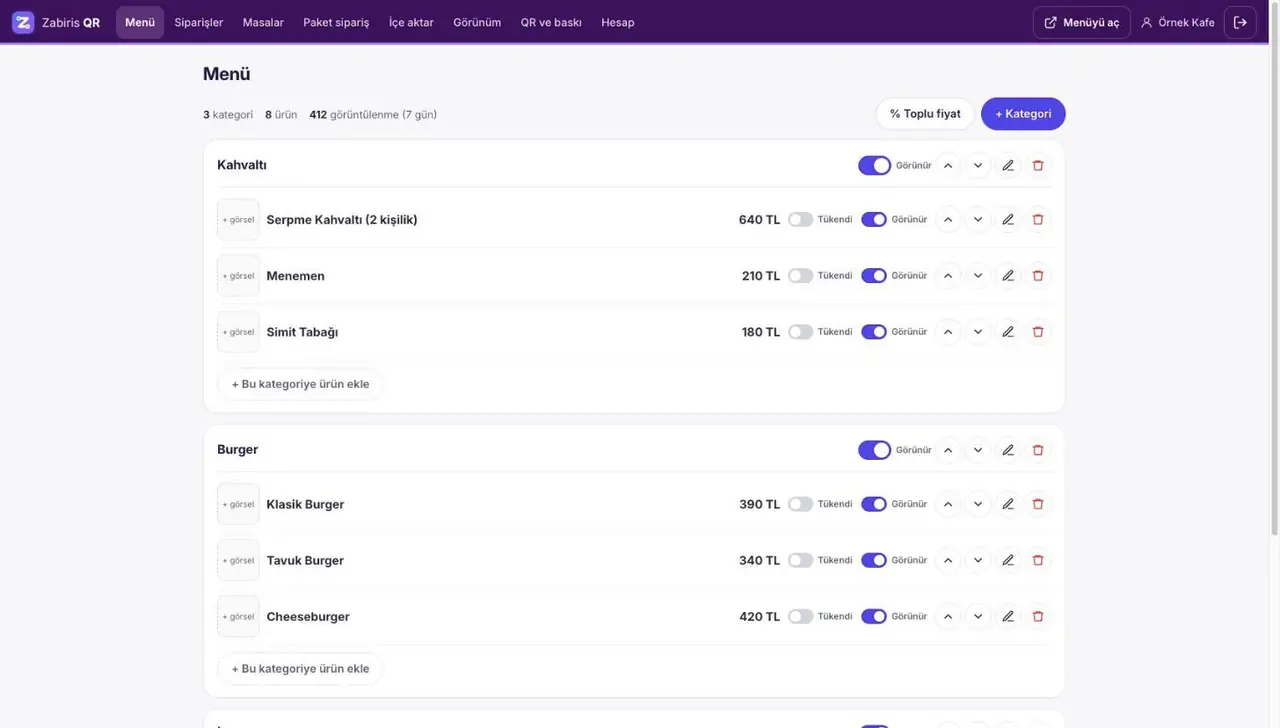
Manage your menu from the panel
Change a price or mark an item sold out; the menu updates on the guest's phone instantly. Table orders, calls and bill requests are in the same panel.
- Price, sold-out and visibility toggles with one tap
- Bulk price update and import from Excel
- Sound alerts for table orders and calls
- If you use Zabiris POS, orders appear on the POS check
Trust
Simple, safe and in your control
Plans
Two plans to fit your needs
Businesses that only want the menu start with QR Menu. Those on Zabiris POS use QR Full for table and delivery orders.
QR Menu
- Menu opens on the phone, no app needed
- Turkish, English, German, Russian
- Price and sold-out changes appear instantly
- Bulk product upload via Excel
- Your own logo and colour
- Table card, printed menu and poster
QR Full
- Everything in QR Menu
- Table management and per-table QR cards
- Table ordering, waiter calling, bill requests
- All of it appears on the Zabiris POS check
- Delivery orders: location, distance limit, delivery fee
- Payment on delivery: cash, card, meal card
Pricing depends on the number of branches and the plan you choose. For a quote, use WhatsApp or request a call.
Who is it for?
Every business that serves at the table
For businesses with a busy dining room, with foreign guests, or that want to take their own delivery orders.
Restaurants
Shorter waiting in the room; the waiter walks less.
Cafés and patisseries
Guests order from their table without walking to the counter.
Bars and bistros
Calls and bill requests are not lost during busy hours.
Hotel restaurants
Foreign guests read the menu in their own language.
Sorular ve yanıtlar
Common questions about QR menu and table ordering
Do customers have to install an app?
No. The customer scans the QR on the table with the phone camera and your menu opens in the browser. No sign-up or app is needed.
Do I have to reprint the QR codes when I change the menu?
No. When you change a price or mark an item sold out, the menu updates immediately. Your table cards and posters stay the same.
Where do table orders go?
Orders, waiter calls and bill requests appear on the Zabiris POS check for the table. You accept, prepare and close the bill from POS. These features are in the QR Full plan.
Can I take delivery orders too?
Yes, with the QR Full plan. The customer opens the same QR or your menu link, adds items to the cart, enters name, phone and address, and marks the location on the map. Orders outside your maximum distance are refused. You set the delivery fee. Payment is on delivery: cash, card or meal card. The order appears on Zabiris POS; the customer follows the status on the phone.
Can I use only the menu?
Yes. The QR Menu plan is for the menu only. In the Full plan, ordering, waiter calls, bill requests and delivery orders can each be switched on and off.
Which languages are supported?
Turkish, English, German and Russian. The menu opens in the customer's language. Items for which you have entered a translation appear in that language; the rest appear in Turkish. Both plans include languages.
What about fake or prank orders?
Every table has its own unpredictable code and rapid repeat orders are limited. Delivery orders have a maximum distance. You see each order before you accept it.
Is payment taken through the QR?
No. In the dining room, the customer only indicates a payment preference: cash, card or meal card. You take payment as usual. For delivery orders, payment is on delivery.
Is any personal information requested from the customer?
Not for table orders; no name or phone number is requested. For delivery orders, name, phone number, address and location are needed for delivery. The customer confirms having read the privacy notice. This information is deleted automatically after 180 days.
Let's bring your menu to the table
Write how many branches you have and whether you use Zabiris POS. We will prepare the right plan and a quote for you.